Form Delivery Check
Your contact form says “sent.” Did the message reach the inbox?
Form Delivery Check submits one clearly marked test inquiry through a browser and looks for that exact marker in the destination inbox. It catches the case where the page turns green while the email never arrives.
For website maintainers, freelancers and small agencies responsible for contact, booking and inquiry forms. Self-hosted, MIT licensed, no hosted account or paid monitoring service required. Python 3.11+ and a Playwright Chromium browser are required. Initial alpha: verified with controlled local browser and mailbox fixtures; external mail providers and real customer sites are not certified.
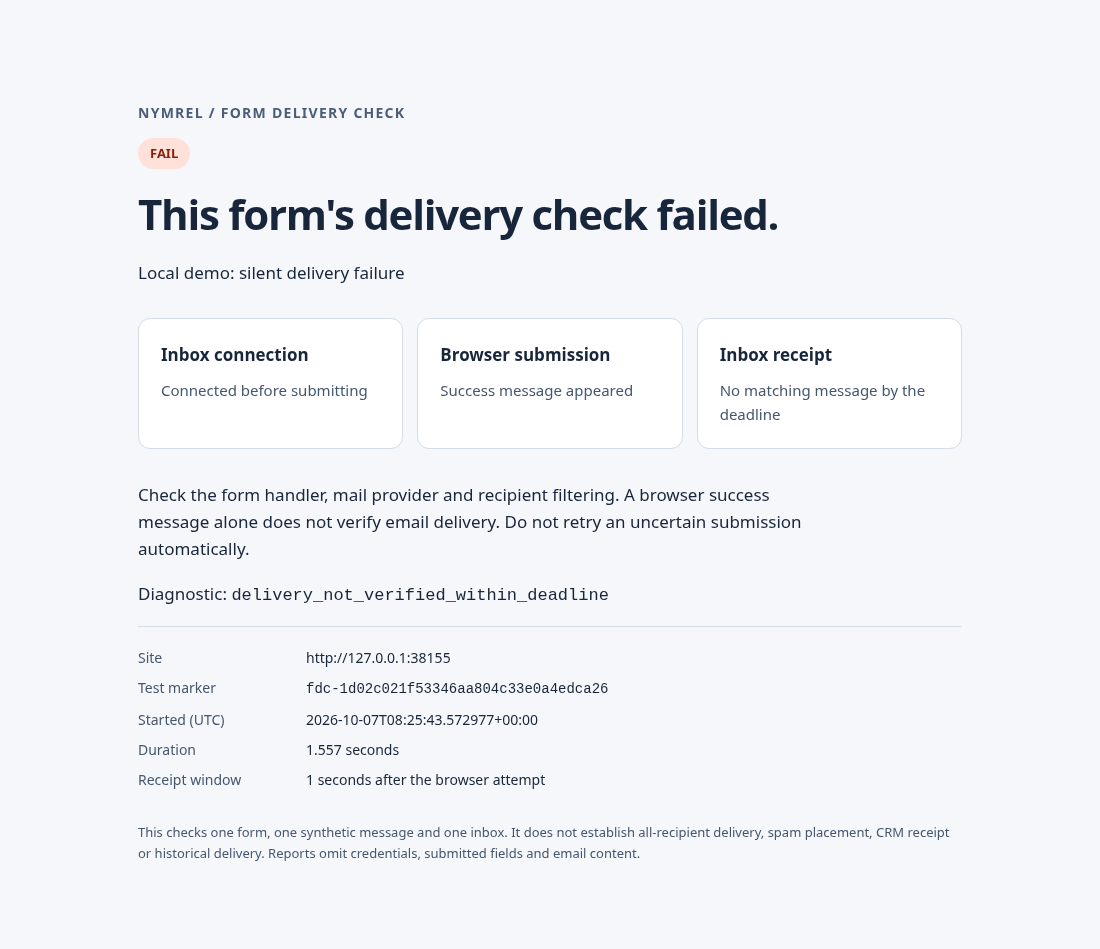
Try it without a website or email account
Download the wheel from the release page, then run:
python -m venv .venv
. .venv/bin/activate
python -m pip install ./form_delivery_check-0.1.0a1-py3-none-any.whl
python -m playwright install chromium

form-delivery-check demo --scenario delivered
form-delivery-check demo --scenario lost
The first demonstration finds the message and exits 0. The second shows the
same success message in the browser but creates no email: the check fails and
exits 1. Each writes a readable HTML report and a JSON receipt under reports/.
The demo runs on localhost and writes synthetic .eml files. It does not send
email or visit a public website. On minimal Linux systems, Playwright may also
need system dependencies: python -m playwright install --with-deps chromium.
To install from source instead, extract the source distribution and run
python -m pip install . inside it. The complete release packet also includes
the tracked source and a Git bundle. The package has not been published to PyPI.
Check your own form
- Copy
examples/contact-imap.jsontolocal-config.json. - Set your page URL, field selectors, submit button, and the success message selector. The success message must appear only after submitting.
- Point the inbox settings at a dedicated monitoring inbox that receives the actual form notification, including a copy if your form sends to several recipients. Putting a monitor address in the visitor email field alone does not redirect an owner's notification email.
- Set the credential environment variables and validate the configuration:
export FORM_CHECK_USER='monitor@your-domain.example'
export FORM_CHECK_PASSWORD='your-existing-app-password'
form-delivery-check validate local-config.json
- Submit one test inquiry to a form you own or maintain:
form-delivery-check run local-config.json --submit --output reports
validate makes no connections. run requires --submit because it creates a
real test inquiry. It connects to the inbox first; a mailbox setup failure stops
the check before the browser submits. It never retries a submission automatically.
No configuration command creates an account, changes your website, installs a schedule or sends an alert. Use the result with your existing monitoring or CI system. Keep alerts independent of the mail route you are testing.
Read the result
| Result | Meaning | Exit |
|---|---|---|
| PASS | Browser acknowledged the inquiry and its exact marker was found in the configured inbox within the receipt window | 0 |
| FAIL | The check ran, but browser acknowledgement or timely inbox receipt was not verified | 1 |
| ERROR | Configuration, browser setup, mailbox access or another necessary check could not be completed | 2 |
Reports show inbox connection, browser submission, and inbox receipt separately. An email that arrives after the deadline is not a timely pass. A click timeout may still have submitted; check the receipt before manually trying again.
For scripts, add --json. Match on schema, status, browser, delivery,
submission_attempted, and error_code. Report filenames use a unique run ID,
so separate runs do not overwrite each other's receipts.
Configuration
- Every run gets a fresh
fdc-marker. At least one text field must contain{{token}}; optional{{timestamp}}expands to the UTC start time. - Field actions are
fill(default),select(an option value), andcheck(a boolean). Selectors must identify the intended field unambiguously. delivery_timeout_seconds: 0.1–300, default 60. The receipt window begins after the browser attempt. Network calls have their own bounded timeouts, so total runtime can exceed the receipt window.browser_timeout_seconds: 1–60, default 20;poll_seconds: 0.05–30, default 2.- IMAP uses TLS with certificate/hostname verification,
EXAMINEandBODY.PEEK[]. It does not mark messages read, delete messages or expunge mail. It considers only UIDs created after inbox preflight, with bounded message size and matching-message counts. This alpha supports app-password/basic IMAP authentication, not OAuth-only providers. - A local mail directory can replace IMAP:
{"type":"maildir","path":"/path/to/mail"}. The checker reads newly created files at the root or innew/andcur/. Your mail client or test fixture must write those files. - Browser navigations, non-GET/HEAD requests and URLs containing the test marker
are restricted to the configured site's origin. If the form intentionally posts to another service, explicitly add
its origin using
allowed_submission_origins, for example["https://forms.your-provider.example"].
Privacy and limits
Use a dedicated monitoring inbox and synthetic inquiry values. Reports omit credentials, submitted field values, email contents, screenshots and URL query strings. Provider errors become stable diagnostic codes. The browser still loads the configured website's ordinary resources, including any third-party services that website uses; the inquiry follows the site's configured delivery path.
This verifies one marked inquiry, one form and one destination inbox. It does not repair SMTP settings, prove all historical messages arrived, verify other recipients or a CRM, determine why delivery failed, bypass CAPTCHAs, or establish general spam placement. Exact matching handles MIME text and subject content; attachments and forwarded message bodies do not count. Forms requiring login, CAPTCHA interaction or unusual widgets need a different testing setup.
The default inbox is INBOX, so a test ending up in spam will fail the configured
inbox check. If you choose a spam folder instead, a pass establishes only receipt
in that folder. No inference of inbox placement is made.
Why this release
Recent first-hand site reports describe missed sponsor inquiries and forms that report success while losing customer messages. Existing form-health plugins can watch submission/mail events without establishing recipient receipt. General browser/email test frameworks can do this too; this project packages the small workflow and reports so a maintainer does not need to build the glue.
See the demand evidence and alternatives. These reports support a useful problem to test; they do not establish adoption or willingness to install this particular tool.
Development
python -m pip install -e .
python -m playwright install --with-deps chromium
python -m unittest discover -s tests -v
Tests cover working and silently broken forms in real Chromium, old and partial
markers, MIME encoding, attachment rejection, report privacy, no-submit behavior,
and IMAP TLS/read-only handling. The local TLS protocol tests create temporary
certificates using openssl; they skip if it is unavailable. No test sends
external email, reads a personal inbox, or submits a public form.
Built by Nymrel. Security · Contributing.